Prepare the server locally
Run this once before adding it to Claude Code.
git clone https://github.com/tasopen/mcp-alphabanana
cd mcp-alphabananaThen follow the repository README for any remaining dependency or build steps.
Add it to Claude Code
Paste the maintainer's config below, then edit any placeholder values.
{
  "mcp": {
    "servers": {
      "alphabanana": {
        "command": "npx",
        "args": [
          "-y",
          "@tasopen/mcp-alphabanana"
        ],
        "env": {
          "GEMINI_API_KEY": "${env:GEMINI_API_KEY}"
        }
      }
    }
  }
}
See the mcp-alphabanana README for full setup instructions.
GEMINI_API_KEYMake your agent remember this setup
mcp-alphabanana's config, env vars, and the gotchas you hit — recalled in every future Claude Code, Cursor, and Codex session.
npx conare@latestFree · one command · indexes the sessions already on disk. Set up in the browser instead →
What it does
- Ultra-fast Gemini image generation across Flash and Pro tiers
- Transparent PNG/WebP asset output for web and game pipelines
- Multi-image style guidance with local reference image files
- Flexible file, base64, or combined outputs for agent workflows
Tools 1
generate_imageGenerates images using Google Gemini with optional transparency, local reference images, grounding, and reasoning metadata.Environment Variables
GEMINI_API_KEYrequiredAPI key for accessing Google Gemini servicesTry it
Original README from tasopen/mcp-alphabanana
mcp-alphabanana
English | 日本語
mcp-alphabanana is a Model Context Protocol (MCP) server for generating image assets with Google Gemini. It is built for MCP-compatible clients and agent workflows that need fast image generation, transparent outputs, reference-image guidance, and flexible delivery formats.
Keywords: MCP server, Model Context Protocol, Gemini AI, image generation, FastMCP
Key capabilities:
- Ultra-fast Gemini image generation across Flash and Pro tiers
- Transparent PNG/WebP asset output for web and game pipelines
- Multi-image style guidance with local reference image files
- Flexible file, base64, or combined outputs for agent workflows
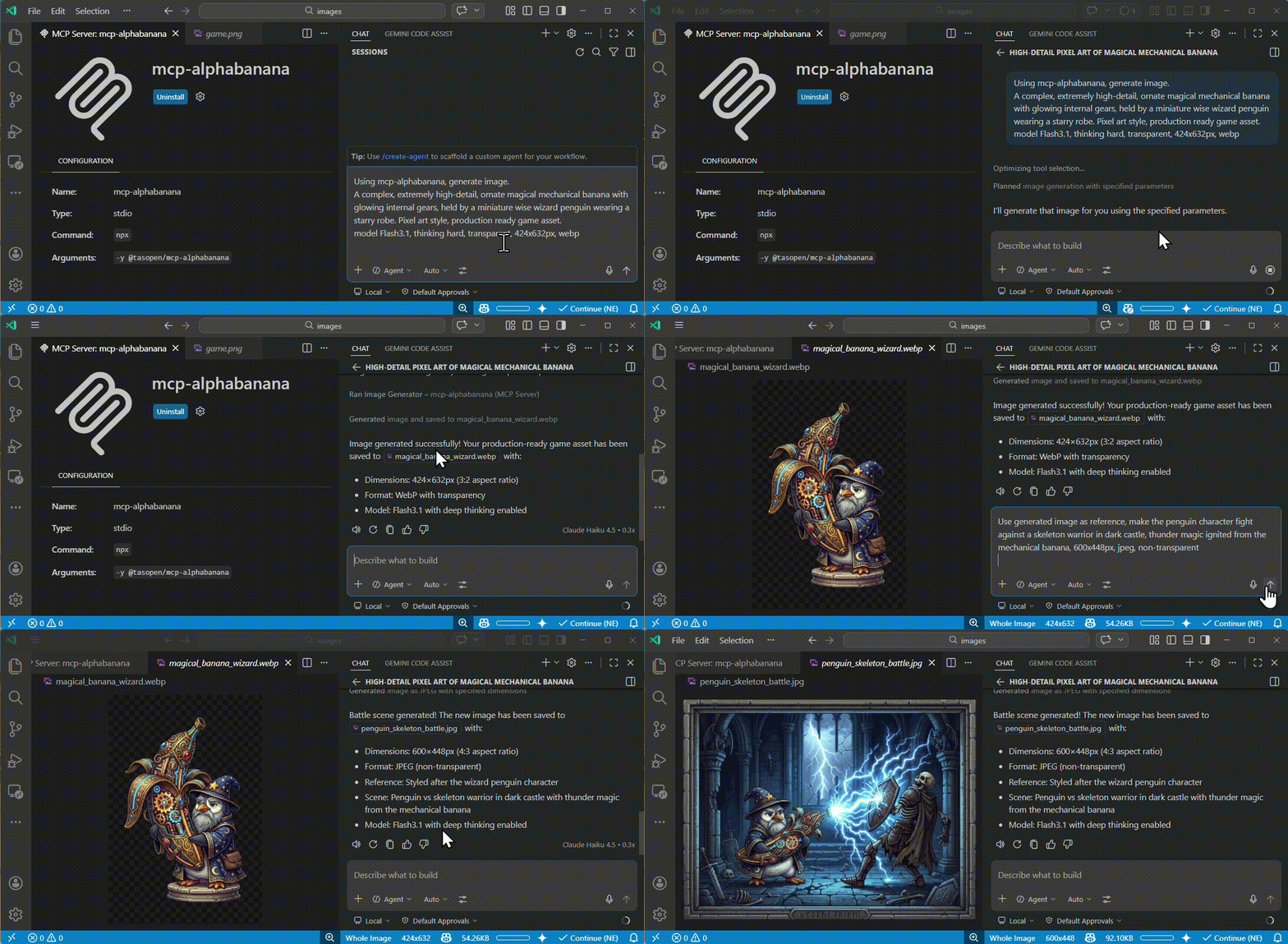
Quick Start
Run the MCP server with npx:
npx -y @tasopen/mcp-alphabanana
Download the latest MCPB bundle for Claude Desktop or registry ingestion:
https://github.com/tasopen/mcp-alphabanana/releases/latest/download/mcp-alphabanana-latest.mcpb
GitHub Releases is the canonical distribution channel for .mcpb bundles. Each release publishes both a versioned asset and the stable mcp-alphabanana-latest.mcpb filename.
Or add it to your MCP configuration:
{
  "mcp": {
    "servers": {
      "alphabanana": {
        "command": "npx",
        "args": ["-y", "@tasopen/mcp-alphabanana"],
        "env": {
          "GEMINI_API_KEY": "${env:GEMINI_API_KEY}"
        }
      }
    }
  }
}
Set GEMINI_API_KEY before starting the server.
Claude Registry
The Claude registry / MCPB package metadata is defined in manifest.json and ships with the static 512x512 icon at images/mcp-alphabanana.png.
Native sharp runtime packages are declared as optional dependencies so .mcpb installs can resolve the correct prebuilt binary on each supported platform without relying on postinstall hooks.
- Stable MCPB URL:
https://github.com/tasopen/mcp-alphabanana/releases/latest/download/mcp-alphabanana-latest.mcpb - Versioned MCPB URL pattern:
https://github.com/tasopen/mcp-alphabanana/releases/download/vVERSION/mcp-alphabanana-VERSION.mcpb - Support: GitHub Issues
MCP Server
This repository provides an MCP server that enables AI agents to generate images using Google Gemini.
It can be used with MCP-compatible clients such as:
- Claude Desktop
- VS Code MCP
- Cursor
Built with FastMCP 3 for a simplified codebase and flexible output options.
Glama MCP Server badge:
<a href="https://glama.ai/mcp/servers/tasopen/mcp-alphabanana">
Available Tools
generate_image
Generates images using Google Gemini with optional transparency, local reference images, grounding, and reasoning metadata.
For Claude Desktop, prefer outputType=file for medium or large images. base64 and combine responses consume Claude context and can hit the client's size limit. On Windows, use the FileSystem extension to choose a writable absolute outputPath and any local referenceImages paths.
Key parameters:
prompt(string): description of the image to generatemodel:Flash3.1,Flash2.5,Pro3,flash,prooutputWidthandoutputHeight: requested final image size in pixels in normal modenoresize+aspectRatio+output_resolution: return Gemini native size without resizingoutput_resolution:0.5K,1K,2K,4Koutput_format:png,jpg,webpoutputType:file,base64,combineoutputPath: required whenoutputTypeisfileorcombinetransparent: enable transparent PNG/WebP post-processingreferenceImages: optional array of local reference image filesgrounding_typeandthinking_mode: advanced Gemini 3.1 controls
Model Selection
| Input Model ID | Internal Model ID | Description |
|---|---|---|
Flash3.1 |
gemini-3.1-flash-image-preview |
Ultra-fast, supports Thinking/Grounding. |
Flash2.5 |
gemini-2.5-flash-image |
Legacy Flash. High stability. Low cost. |
Pro3 |
gemini-3.0-pro-image-preview |
High-fidelity Pro model. |
flash |
gemini-3.1-flash-image-preview |
Alias for backward compatibility. |
pro |
gemini-3.0-pro-image-preview |
Alias for backward compatibility. |
Parameters
Full parameter reference for the generate_image tool.
| Parameter | Type | Default | Description |
|---|---|---|---|
prompt |
string | *r |